
Go Big. Game Big.
With the all-new 75” Samsung AI Gaming TV
Own it now from RM62/mth
Game Harder Stream Faster
Power your play with the Game-Grade 5G Router — built for smooth
gaming, faster streaming, and wider Wi-Fi coverage at just RM68/mth

Best of Home
Entertainment
Enjoy the best 5G home Wi-Fi & entertainment pack
at only RM98/mth

FREE 1-Month U Home 5G
Apply coupon code FREE5G to enjoy RM68 off
{{deviceBrand}}
{{deviceModel}}

{{submittedDetailsLabel}}
- {{interestedInLabel}}
- {{data.find(item => item.fieldName === 'IM_INTERESTED_IN' ).fieldValue}}
- {{salutationLabel}}
- {{data.find(item => item.fieldName === 'SALUTATION' ).fieldValue}}
- {{fullNameLabel}}
- {{data.find(item => item.fieldName === 'NAME' ).fieldValue}}
- {{idTypeLabel}}
- {{data.find(item => item.fieldName === 'ID_TYPE' ).fieldValue}}
- {{idNumberLabel}}
- {{data.find(item => item.fieldName === 'ID_NO' ).fieldValue}}
- {{mobileNumberLabel}}
- {{data.find(item => item.fieldName === 'PHONE_NO' ).fieldValue}}
- {{emailAddressLabel}}
- {{data.find(item => item.fieldName === 'EMAIL' ).fieldValue}}
- {{adresssLineLabel}}
- {{data.find(item => item.fieldName === 'ADDRESS_LINE' ).fieldValue}}
- {{postcodeLabel}}
- {{data.find(item => item.fieldName === 'POSTCODE' ).fieldValue}}
- {{stateLabel}}
- {{data.find(item => item.fieldName === 'STATE' ).fieldValue}}
- {{cityLabel}}
- {{data.find(item => item.fieldName === 'CITY' ).fieldValue}}
{{yourSelectedPlanLabel}}
- {{broadbandPlanLabel}}
- {{data.find(item => item.fieldName === 'BROADBAND_PLAN' )?.fieldValue}}
- {{selectedPostpaidOptionPlanLabel}}
- {{selectedPostpaidOptionPlan}}
- {{monthlyFeeLabel}}
- {{data.find(item => item.fieldName === 'MONTHLY_FEE' )?.fieldValue}}
{{personalDetailsFormLabel}}
- {{salutationLabel}}
- {{data.find(item => item.fieldName === 'SALUTATION' )?.fieldValue}}
- {{fullNameLabel}}
- {{data.find(item => item.fieldName === 'NAME' )?.fieldValue}}
- {{idTypeLabel}}
- {{data.find(item => item.fieldName === 'ID_TYPE' )?.fieldValue}}
- {{idNumberLabel}}
- {{data.find(item => item.fieldName === 'ID_NO' )?.fieldValue}}
- {{mobileNumberLabel}}
- {{data.find(item => item.fieldName === 'PHONE_NO' )?.fieldValue}}
- {{emailAddressLabel}}
- {{data.find(item => item.fieldName === 'EMAIL' )?.fieldValue}}
{{installationAddressFormLabel}}
- {{installationBuildingNameLabel}}
- {{data.find(item => item.fieldName === 'INSTALLATION_BUILDING_NAME' )?.fieldValue}}
- {{installationUnitBlockLabel}}
- {{data.find(item => item.fieldName === 'INSTALLATION_BLOCK_NUMBER' )?.fieldValue}}
- {{installationUnitNumberLabel}}
- {{data.find(item => item.fieldName === 'INSTALLATION_UNIT_NUMBER' )?.fieldValue}}
- {{installationAddressLineLabel}}
- {{data.find(item => item.fieldName === 'INSTALLATION_ADDRESS_LINE' )?.fieldValue}}
- {{installationPostcodeLabel}}
- {{data.find(item => item.fieldName === 'INSTALLATION_POSTCODE' )?.fieldValue}}
- {{installationStateLabel}}
- {{data.find(item => item.fieldName === 'INSTALLATION_STATE' )?.fieldValue}}
- {{installationCityLabel}}
- {{data.find(item => item.fieldName === 'INSTALLATION_CITY' )?.fieldValue}}
- {{installationServiceProviderLabel}}
- {{data.find(item => item.fieldName === 'SERVICE_PROVIDER' )?.fieldValue}}
{{registrationAddressFormLabel}}
- {{registrationBuildingNameLabel}}
- {{data.find(item => item.fieldName === 'REGISTRATION_BUILDING_NAME' )?.fieldValue}}
- {{registrationUnitBlockLabel}}
- {{data.find(item => item.fieldName === 'REGISTRATION_BLOCK_NUMBER' )?.fieldValue}}
- {{registrationUnitNumberLabel}}
- {{data.find(item => item.fieldName === 'REGISTRATION_UNIT_NUMBER' )?.fieldValue}}
- {{registrationAddressLineLabel}}
- {{data.find(item => item.fieldName === 'REGISTRATION_ADDRESS_LINE' )?.fieldValue}}
- {{registrationPostcodeLabel}}
- {{data.find(item => item.fieldName === 'REGISTRATION_POSTCODE' )?.fieldValue}}
- {{registrationStateLabel}}
- {{data.find(item => item.fieldName === 'REGISTRATION_STATE' )?.fieldValue}}
- {{registrationCityLabel}}
- {{data.find(item => item.fieldName === 'REGISTRATION_CITY' )?.fieldValue}}
- {{registrationServiceProviderLabel}}
- {{data.find(item => item.fieldName === 'SERVICE_PROVIDER' )?.fieldValue}}
Fibre-like Speeds at Home for All
Lightning-fast, fibre-like speeds delivered right to your home.
Optimised for 5G-Advanced
Enhanced Wi-Fi Coverage
Unlimited Hi-Speed Home Wi-Fi
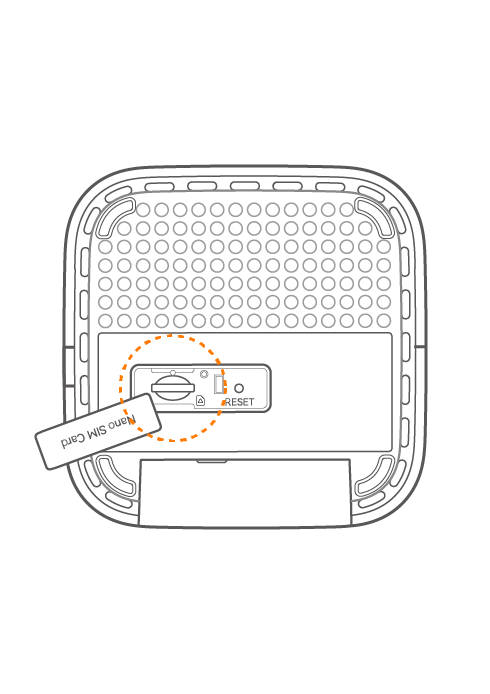
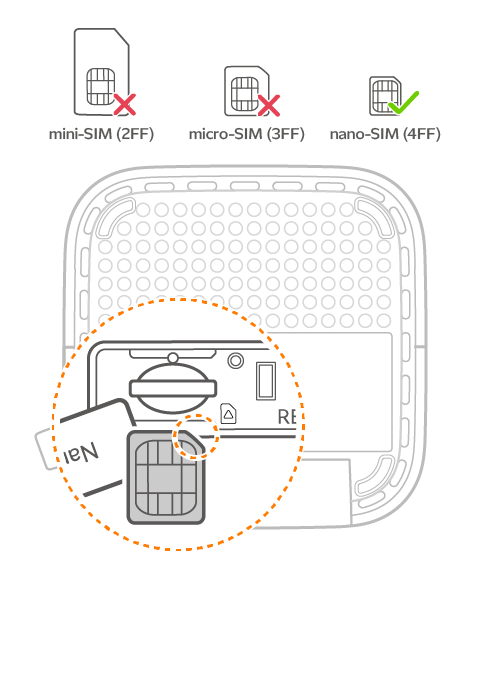
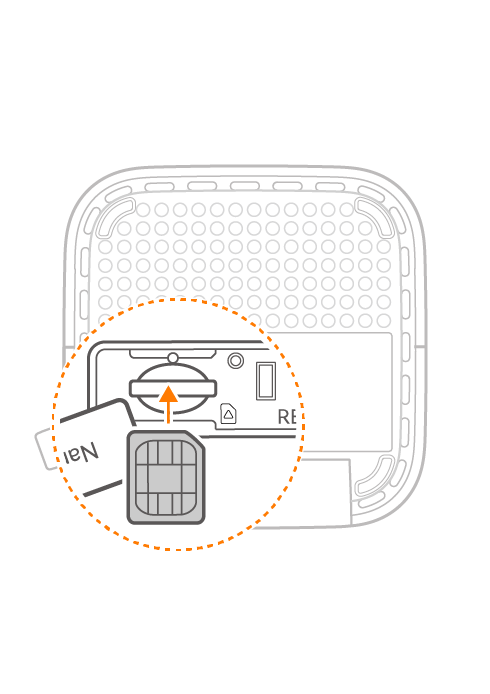
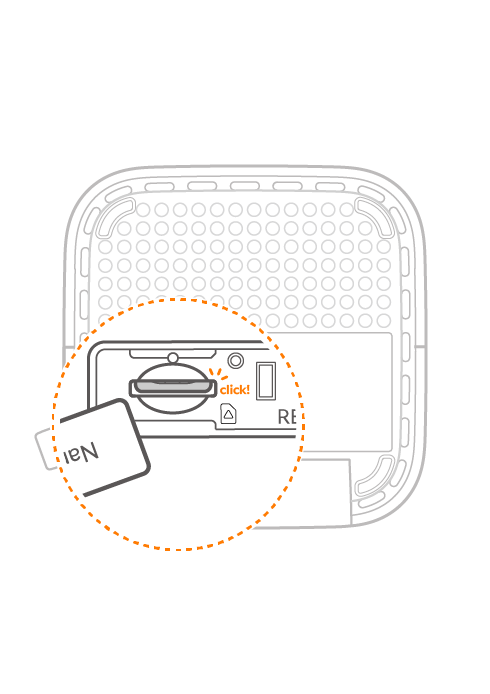
How to insert your U Home 5G SIM card into our Wi-Fi 6 5G Router
Step 1
Locate the SIM slot at the bottom of the device.
Step 2
Align the SIM notch so the orientation matches the illustration. Do not forcibly insert the SIM as it will only go in one way. Please note that only nano SIM cards can be used.
Step 3
Insert SIM with the golden contacts facing up.
Step 4
Push the SIM card into the slot until you hear a click, and your device is now ready to use.
How to Purchase U Home 5G x sooka Premium
Step 1
Purchase U Home 5G SIM Pack from our Online Store.
Step 2
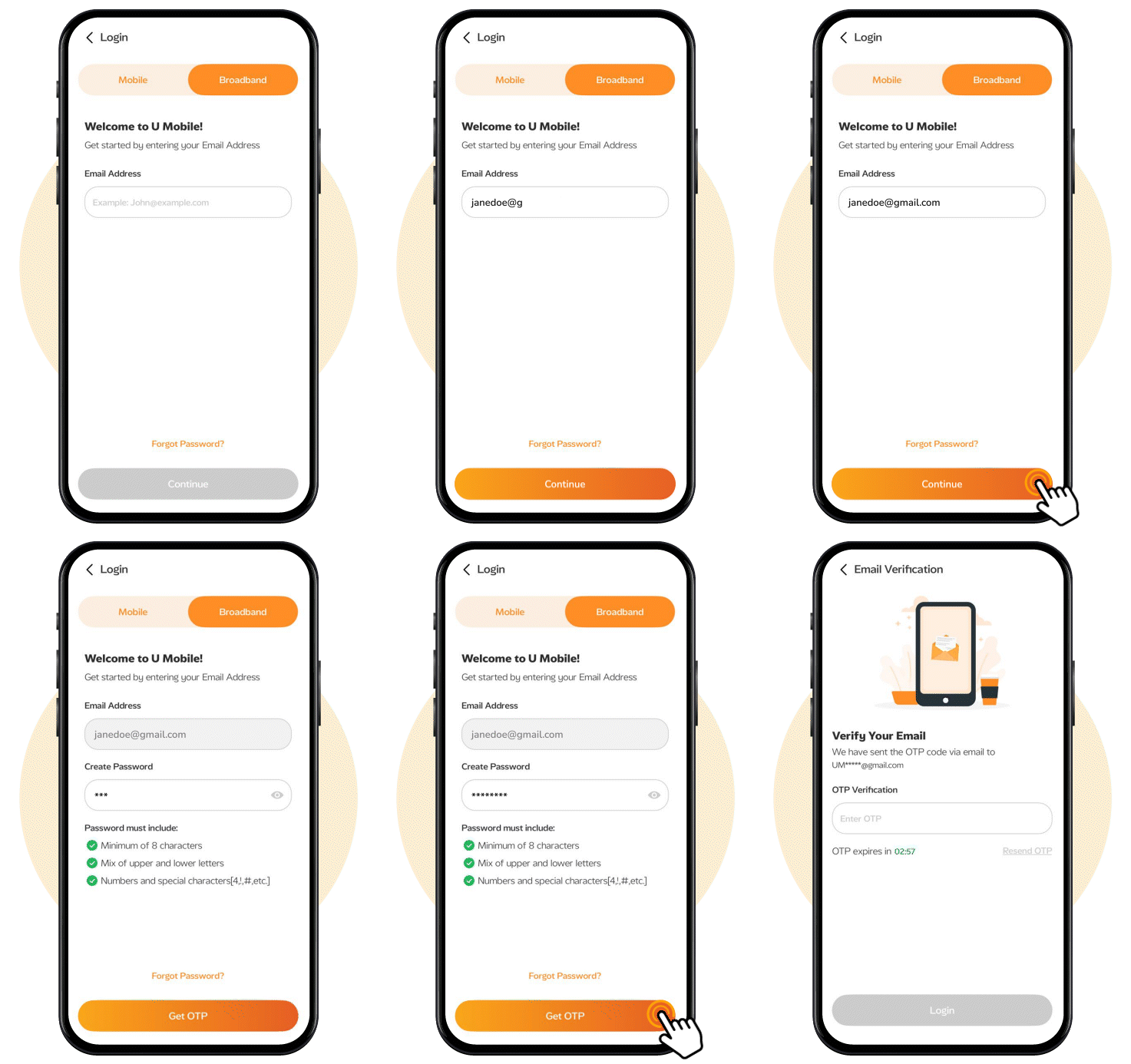
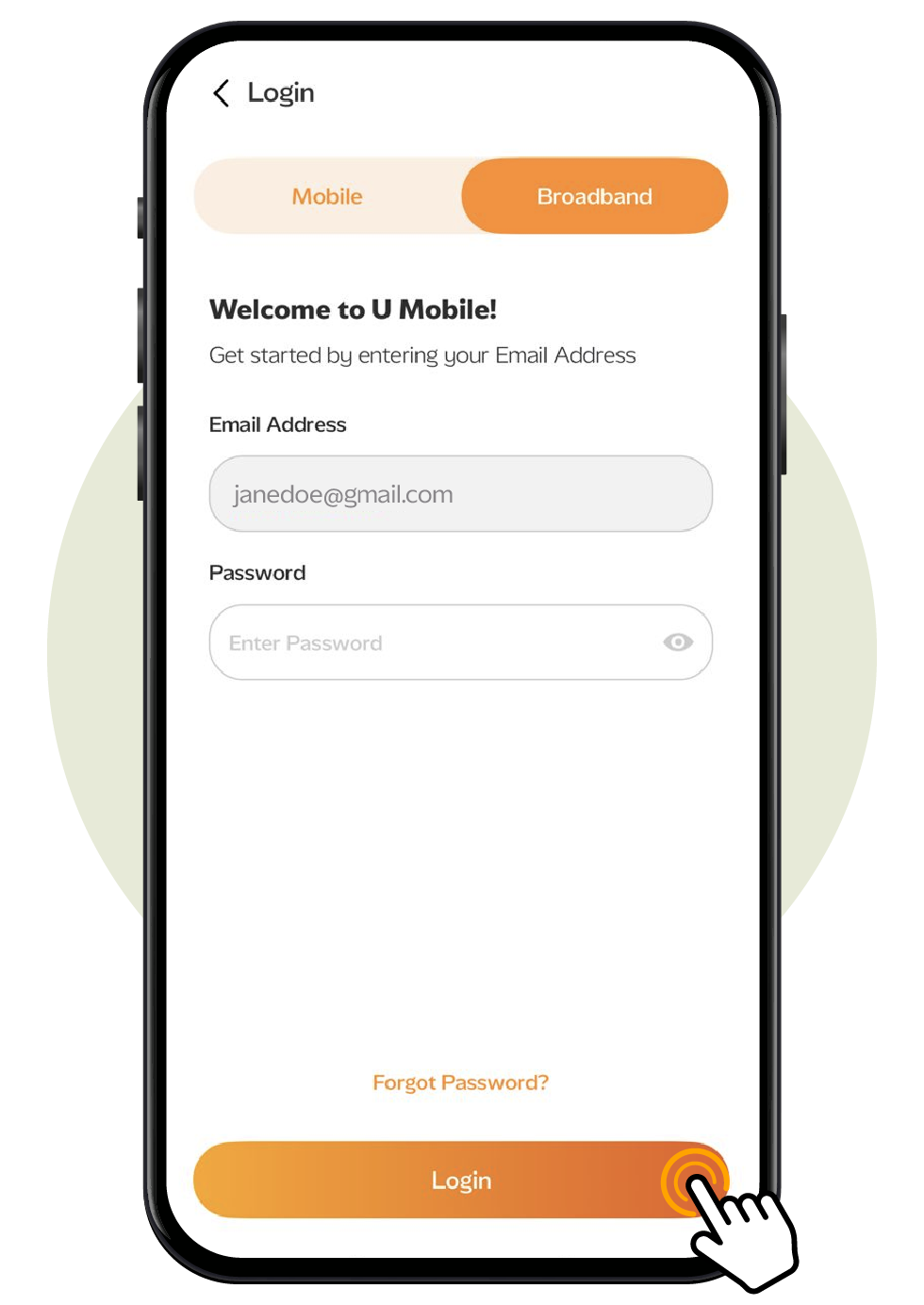
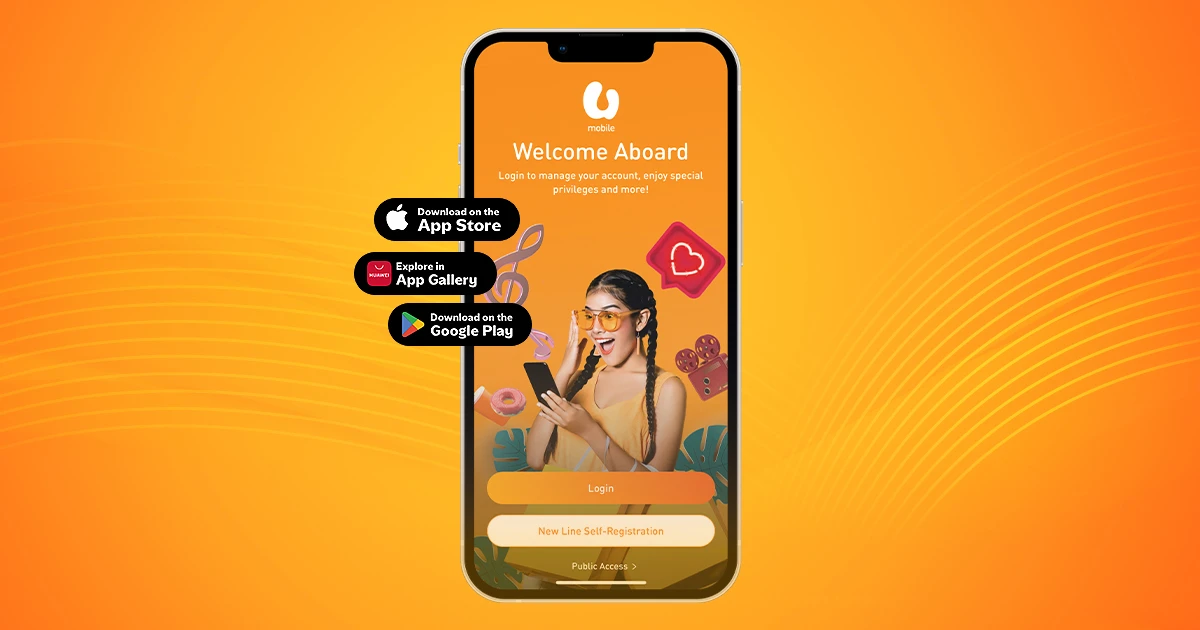
Download and open the MyUMobile App, tap "Broadband", and set up your account by entering your email and password. Complete the OTP verification, then tap "Login" to proceed.
Step 3
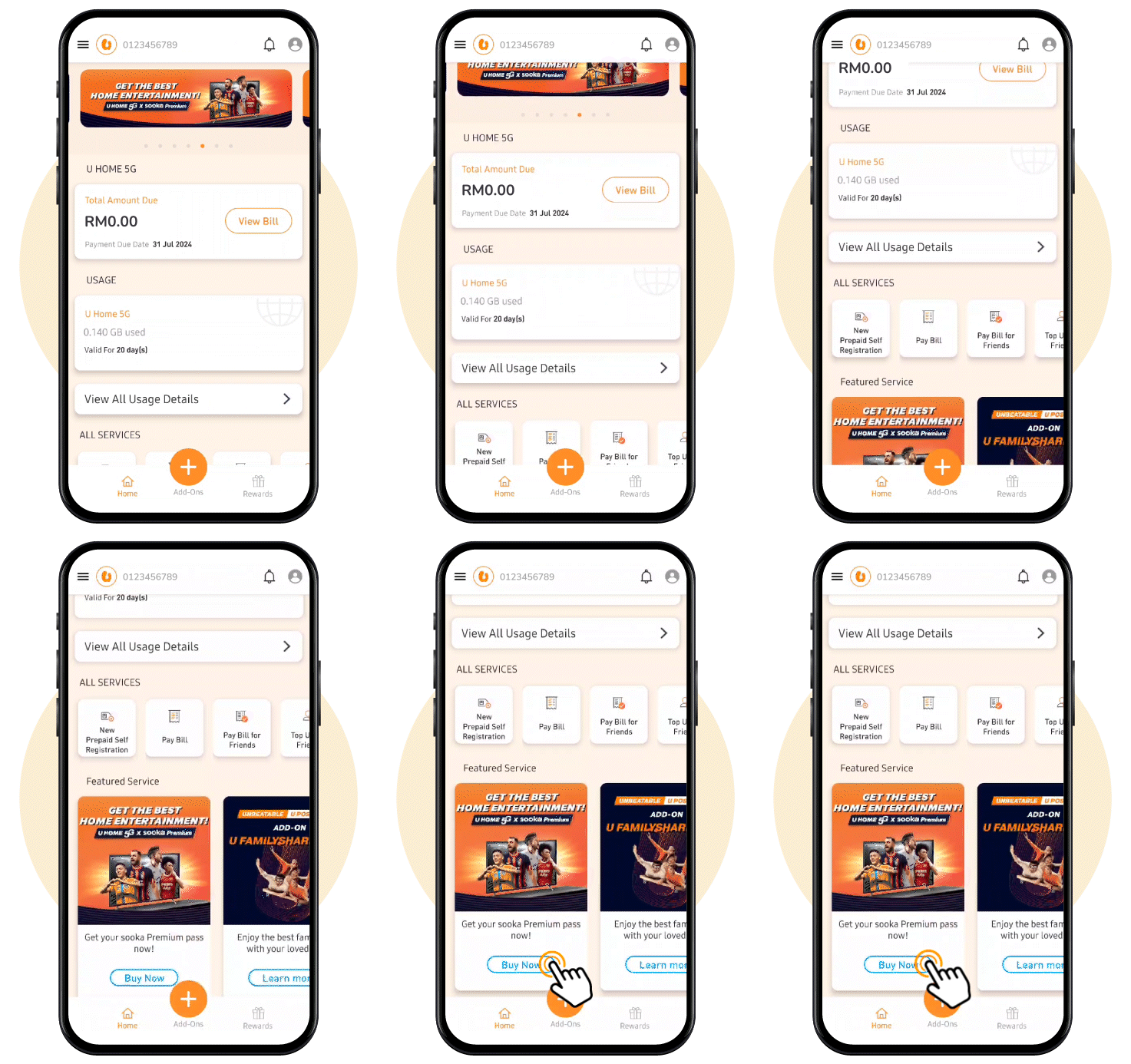
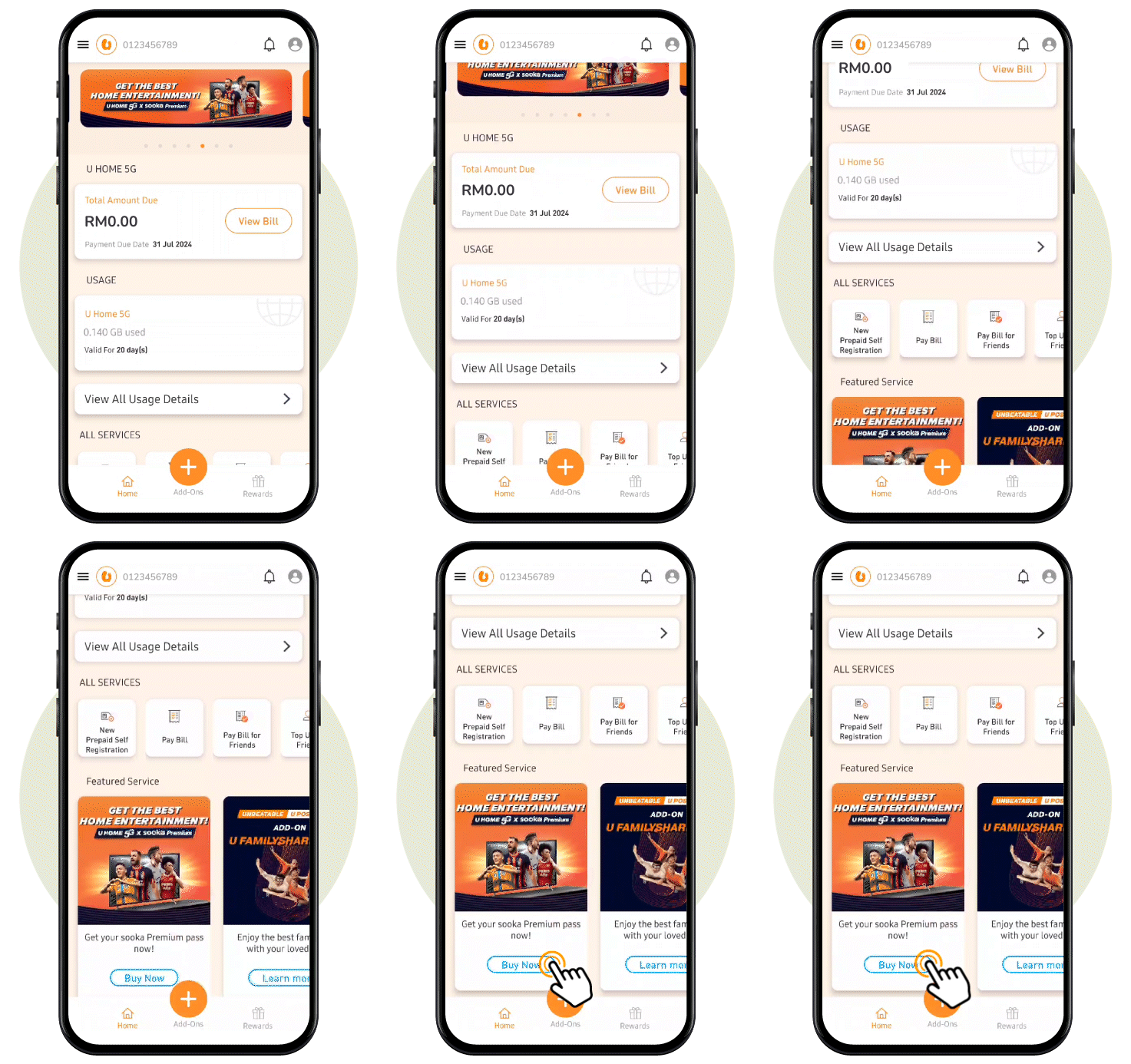
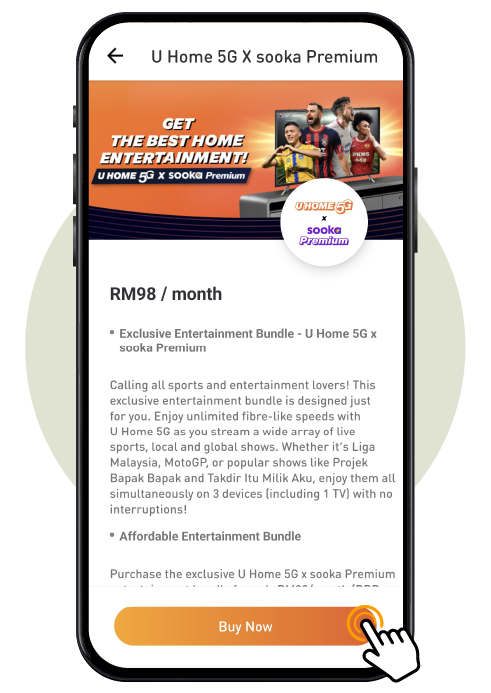
Locate the 'U Home 5G x sooka Premium' banner in the homepage or find it under Featured Service, then tap ‘Buy Now' to proceed to the product page.
Step 4
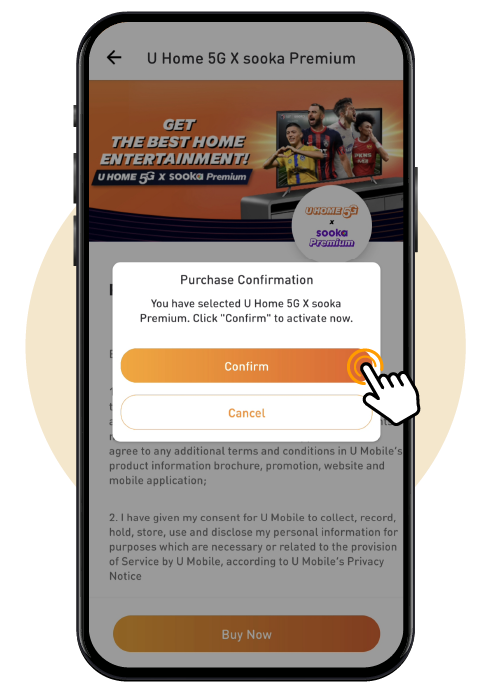
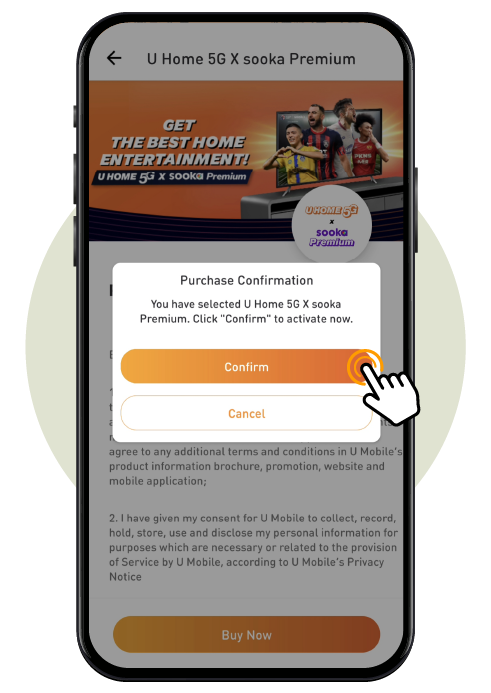
On the product page, tap on 'Buy Now’ again. Then, tap on 'Confirm' to confirm your purchase. You'll receive a confirmation email for steps to activate your sooka Premium account.

Step 1
Launch the MyUMobile App, tap "Broadband", enter your registered email and password, then tap "Login".
Step 2
Locate the 'U Home 5G x sooka Premium' banner in the homepage or find it under Featured Service, then tap 'Buy Now' to proceed.
Step 3
On the product page, tap on 'Buy Now’ again.
Step 4
Confirm your purchase by selecting 'Confirm'. Then, you'll receive a confirmation email for steps to activate your sooka Premium account.


ULTRA5G
Enjoy next gen speed and performance with ULTRA5G coverage in selected areas.

5G Network
5G coverage is available at your location.

4G Network
4G coverage is available at your location.
Disclaimer: While we have mapped our coverage maps as accurately as possible based on our latest available data and tools, our coverage maps only provide a general indication of the coverage service areas. As with all mobile phone networks, there may be some areas where reception is limited or unavailable. These coverage maps are not a guarantee of service availability, signal strength or data speeds at any specific location. Actual user experience may vary due to systems limitation, device type and capability, location, environmental conditions, terrain, weather, ongoing network deployment or maintenance activities and general network traffic. Coverage based on outdoor signals may not reflect indoor coverage. U Mobile may update or modify the network at any time and our coverage information is subject to change.
More Services

Frequently Asked Questions
- What is the "Free 5G Router with U Home 5G”?
The “Free 5G Router with U Home 5G” is a promotion that allows you to enjoy a 5G Router when you sign up for U Home 5G, subject to the Minimum Commitment Period.
- How do I use the Router?
Sign-up for U Home 5G and pop the SIM into the Router. Within a few minutes you will be connected to the internet.
- What is the duration of the Minimum Commitment Period?
The Minimum Commitment Period is 24 months.
- What SIMs will work with the Router?
The Router will only work with U Home 5G SIMs.
- Why does my Router vary in appearance?
Imagery shown is for illustration purposes and may not be an exact representation of the final product delivered.
- Will I be able to choose my Router model?
No, Router distribution will be random and is dependent on stock availability.
- Will the Router work in an area with 4G-only coverage?
Yes, the Router will work in both 5G and 4G environments.
- Who is eligible to register for the Router with U Home 5G?
Anyone above 18 years old residing within the service coverage areas in Malaysia without any outstanding payments with U Mobile.
- Can existing U Home 5G plan subscribers take on a free Router?
Yes, they may do so via any of our eligible channels and signing up for the Minimum Commitment Period.
- Does U Mobile reserve the right to change the eligibility criteria?
Yes, U Mobile reserves the right to change the eligibility criteria whenever necessary.
- What is the deposit requirement for non-Malaysians?
For non-Malaysians, a RM500 deposit is required to be eligible for the free Router.
- Are there any provisions for carrying over parts of the Monthly Fee to the following months?
No, the Monthly Fee must be paid in full even if the full value of the service is not used.
1. Where can I purchase U Home 5G with Samsung TV?
You can go to the nearest U Mobile Centre or any authorised Dealers listed here.
You can also choose to submit a registration of interest here. Our team will reach out to you as soon as possible with additional details.
2. Who is eligible to purchase the bundle?
All new and existing U Mobile customers can purchase the U Home 5G with Samsung TV bundle, subject to eligibility listed in our Terms and Conditions.
1. When can I expect my TV to be delivered?
Delivery within Peninsular Malaysia will take up to 1 week and delivery to East Malaysia will take up to 2 weeks depending on delivery lead time.
2. Can I change my delivery address after purchasing?
Yes, you can change your delivery address by contacting our Customer Care team at 018-3881318.
3. What if I am unavailable during delivery?
You can reach out to our fulfilment partners to request for delivery rescheduling.
4. Who will be reaching out to me to schedule the delivery of my TV?
Our fulfilment partners (Servex & MTT) will be reaching out to you via WhatsApp from one of the following numbers:
Phone Number 1: +6 012-9696 485
Phone Number 2: +6 012-9696 465
Phone Number 3: +6 012-6392 436
Phone Number 4: +6 012-5342 996
5. Will installation services be provided?
Basic installation (unboxing etc.) is free. Custom installation such as wall mounting will incur an additional charge payable directly to our fulfilment partners.
6. How do I track the status of my order?
Our fulfilment partners will provide you with a unique tracking link which you can use to track the status of your order.
If you have not received the tracking link, please call our Customer Care team at 018-3881318.
1. Am I allowed to purchase U Home 5G with Samsung TV and U Home 5G with Free 5G Router?
Yes, you may activate both bundles at the same time.
2. Can I terminate the contract and keep the U Home 5G line?
Yes, you can terminate the contract by clearing any remaining outstanding amounts without terminating the line.
3. I am a new U Home 5G subscriber. Do I have to take the Free 5G Router when I purchase the U Home 5G with Samsung TV Bundle?
No, the Free 5G Router is optional and you are not required to take one upon purchase of your U Home 5G with Samsung TV Bundle.
4. Why does my contract start even though the TV hasn’t been delivered yet?
The TV contract starts immediately upon confirming your order as we begin preparing for the TV fulfilment with our delivery partners.
- Is U Home 5G a 5G – ready plan?
Yes, it is. U Home 5G subscribers with compatible 5G devices (Router, Modem or Mobile phones) can experience the full potential of our 5G network subject to availability.
- What is the U Home 5G Plan?
It is our new ultra-fast 5G & 4G broadband subscription service with unlimited data.
- What speeds can I expect from U Home 5G?
U Home 5G offers uncapped speeds. You can expect to get the fastest possible speeds when you are connected to our network.
Digital Nasional Berhad (DNB) guarantees a minimum download speed of 100Mbps across Malaysia’s 5G network. This means that you should be able to achieve at least 100Mbps download speeds within 5G coverage areas.
- Can I share the data through Hotspot and what is the quota allocation for Hotspot?
Yes, you can share the U Home 5G data through Hotspot with no device restrictions.
- Does U Home 5G come with a router and/or modem?
No, U Home 5G is a SIM only plan.
- Can I view my data usage?
Users can refer to the MyUMobile AppMyUMobile App to see their data usage. However, there are no concerns on data usage as our broadband plan provides Unlimited Data usage.
- Is there any deposit fee or upfront payment required upon registration?
Foreigners are required to place RM500 and upfront payment as a deposit upon registration. Malaysian citizens and permanent residents are only required to pay an advance upfront payment equivalent to one month’s charges.
- Do I get back my RM500 deposit if I terminate the service?
Upon your request to terminate our service, the deposit will be refunded back to you after 60 working days. Do note that we will offset your deposit with your last billed amount and any other relevant charges.
- Can I change my current Postpaid or Wireless Broadband (WBB) plan to U Home 5G?
You are not allowed to convert your current Postpaid plan to U Home 5G and would have to register for a new U Home 5G plan. However, wireless broadband plans (WB48, WB68, WBB88,WB128) can be converted to U Home 5G. Terms and conditions apply.
- Where can I subscribe or get more inquiries regarding U Home 5G?
- Visit any of our U mobile stores nationwide
- Call our Customer Service team at 018- 388 1318.
- Visit any of our U mobile stores nationwide
- What devices are compatible with U Home 5G?
U Home 5G can be used with a variety of 5G and / or 4G LTE devices. You can also use it in your smart devices such as phones, tablets, smart cameras and GPS trackers. U Mobile bears no responsibility should customers purchase a device that is not compatible with Malaysia’s 5G and 4G networks.
Please refer to our website at www.u.com.my/Home5G for examples of reliable devices.
- Does my U Home 5G plan comes with SMS and Voice/Video call?
No, U Home 5G is purely for data usage only.
- Can I use the unlimited data from my U Home 5G plan overseas?
No, the plan is for domestic usage only (within Malaysia).
- Is there any contract tied with the subscription?
There is no contract tied to this plan. You may cancel anytime without any penalties.
- Is there any speed cap for U Home 5G?
U Home 5G comes with uncapped speeds. Note that we will manage your surfing speeds if any abuse or unusually high usage occurs.
- Is P2P allowed on U Home 5G?
P2P and torrenting is not allowed on U Home 5G.
- Are there any speed restrictions with U Home 5G?
We may restrict your speeds if we detect abuse or unusually high usage above 1,000GB.
- Where can I subscribe to U Home 5G?
You can purchase the plan at any of the options below:
- U Mobile Online Store: https://shop.u.com.my/
- Visit any of our U Mobile stores nationwide.
- U Mobile Online Store: https://shop.u.com.my/
- Who is eligible to register for U Home 5G?
- Anyone living in Malaysia above 18 years old.
- The plan is available for new registration.
- Existing Ultra Unlimited Wireless Broadband subscribers are entitled to Change Rate Plan (CRP) (WBB48, WBB68, WBB88, WBB128) to U Home 5G.
- How can I check which areas are covered for U Home 5G?
Check for your coverage here.
- What are the relevant documents required to register for U Home 5G?
- NRIC for Malaysians and permanent residents.
- Passport for Non-Malaysian citizens / foreigners.
- What do I get upon successful registration of U Home 5G?
You will get a U Mobile SIM card only. Upon receipt of SIM card, pair it with 5G Wi-Fi routers to experience the full potential of 5G broadband speeds.
- Are there any payments I need to pay during registration?
Yes, there are, such as the following:
- Upfront payment applies to all U Home 5G subscribers.
- Refundable deposit fee (RM500) applies to non-Malaysian citizen.
- U Mobile may from time to time revise the payment at our absolute discretion.
- What is an Upfront Payment?
- It’s an advance payment that is equivalent to the monthly commitment you would make when you sign up and register a Broadband plan.
- For example, the upfront payment for U Home 5G will be RM68.
- This payment will be collected once you sign up for your chosen plan.
- The upfront payment will used to offset your next month’s bill and if there is any outstanding balance, the customer will required to pay the balance.
- Would U Mobile help me install U Home 5G into my personal device?
No technical installation is required. U Home 5G is designed to be a plug and play service. You simply insert the SIM into the device of your choice on your own.
Note that subscriptions via U Mobile eShop requires activation by keying in the last 4 digits of your SIM serial number into your eShop account.
sooka is a Malaysian streaming service that offers a variety of free and premium content. It includes live sports and TV channels as well as on-demand content such as TV series, movies and more.
sooka can be enjoyed on a variety of devices, including smartphones, tablets, computers, and smart TVs.
U Home 5G x sooka Premium is a 5G broadband and entertainment package bundled into one unbeatable price. It is available exclusively for all U Home 5G subscribers.
U Home 5G x sooka Premium is offered exclusively to active U Home 5G subscribers via the MyUMobile App. If you are not a subscriber, you may register at https://shop.u.com.my/ or through any of our outlets or dealers.
Customers who register for U Home 5G during the promo period will receive RM10 rebate off from the normal charges of RM78 per month. This rebate will be prorated according to your first bill and will automatically be reflected on your subsequent monthly bills.
The Launch Promo will be available until further notice.
This launch promo applies to anyone who subscribes to U Home 5G during the promo period.
How to insert your U Home 5G SIM card into our Wi-Fi 6 5G Router
Step 1
Find Slot
Locate the SIM slot at the bottom of the device.
Step 2
Align SIM
Align the SIM card so it's oriented with the notch on the top right.
Note: Only nano SIM cards can be used.
Step 3
Insert SIM
Insert SIM card with the golden contacts facing up.
Step 4
Use Device
Push the SIM card into the slot until you hear a click. Your device is now ready to be used.
How to Purchase U Home 5G x sooka Premium
Step 2
Log in
On your MyUMobile App, tap 'Log In', select 'First-time Login', and enter the U Mobile number on the SIM Pack and 6 digit pin to login.
Step 3
Select Banner
Find the 'U Home 5G x sooka Premium' banner on the homepage or under Featured Service, then tap 'Buy Now' to proceed to the product page.
Step 4
Confirm Purchase
On the product page, tap 'Buy Now' again, then 'Confirm'. You'll receive a confirmation email with steps to activate your sooka VIP account.
Step 1
Launch MyUMobile App
Launch your MyUmobile App and enter your U Mobile number and 6 digit PIN to log in.
Step 2
Select Banner
Locate the 'U Home 5G x sooka VIP' banner in the homepage or under Featured Service, then tap 'Buy Now' to proceed.
Step 3
Confirm Purchase
Select 'Confirm' to complete your purchase. You'll receive an email with steps to activate your sooka VIP account.
- Is U Home 5G a 5G – ready plan?
Yes, it is. U Home 5G subscribers with compatible 5G devices (Router, Modem or Mobile phones) can experience the full potential of our 5G network subject to availability.
- What is the U Home 5G Plan?
It is our new ultra-fast 5G & 4G broadband subscription service with unlimited data.
- What speeds can I expect from U Home 5G?
U Home 5G offers uncapped speeds. You can expect to get the fastest possible speeds when you are connected to our network.
Digital Nasional Berhad (DNB) guarantees a minimum download speed of 100Mbps across Malaysia’s 5G network. This means that you should be able to achieve at least 100Mbps download speeds within 5G coverage areas.
- Can I share the data through Hotspot and what is the quota allocation for Hotspot?
Yes, you can share the U Home 5G data through Hotspot with no device restrictions.
- Does U Home 5G come with a router and/or modem?
No, U Home 5G is a SIM only plan.
- Can I view my data usage?
Users can refer to the MyUMobile AppMyUMobile App to see their data usage. However, there are no concerns on data usage as our broadband plan provides Unlimited Data usage.
- Is there any deposit fee or upfront payment required upon registration?
Foreigners are required to place RM500 and upfront payment as a deposit upon registration. Malaysian citizens and permanent residents are only required to pay an advance upfront payment equivalent to one month’s charges.
- Do I get back my RM500 deposit if I terminate the service?
Upon your request to terminate our service, the deposit will be refunded back to you after 60 working days. Do note that we will offset your deposit with your last billed amount and any other relevant charges.
- Can I change my current Postpaid or Wireless Broadband (WBB) plan to U Home 5G?
You are not allowed to convert your current Postpaid plan to U Home 5G and would have to register for a new U Home 5G plan. However, wireless broadband plans (WB48, WB68, WBB88,WB128) can be converted to U Home 5G. Terms and conditions apply.
- Where can I subscribe or get more inquiries regarding U Home 5G?
- Visit any of our U mobile stores nationwide
- Call our Customer Service team at 018- 388 1318.
- Visit any of our U mobile stores nationwide
- What devices are compatible with U Home 5G?
U Home 5G can be used with a variety of 5G and / or 4G LTE devices. You can also use it in your smart devices such as phones, tablets, smart cameras and GPS trackers. U Mobile bears no responsibility should customers purchase a device that is not compatible with Malaysia’s 5G and 4G networks.
Please refer to our website at www.u.com.my/Home5G for examples of reliable devices.
- Does my U Home 5G plan comes with SMS and Voice/Video call?
No, U Home 5G is purely for data usage only.
- Can I use the unlimited data from my U Home 5G plan overseas?
No, the plan is for domestic usage only (within Malaysia).
- Is there any contract tied with the subscription?
There is no contract tied to this plan. You may cancel anytime without any penalties.
- Is there any speed cap for U Home 5G?
U Home 5G comes with uncapped speeds. Note that we will manage your surfing speeds if any abuse or unusually high usage occurs.
- Is P2P allowed on U Home 5G?
P2P and torrenting is not allowed on U Home 5G.
- Are there any speed restrictions with U Home 5G?
We may restrict your speeds if we detect abuse or unusually high usage above 1,000GB.